1. Photograph the real constraints
Table Dressing is one theme in Etsy's autumn/winter report. Our application is a holiday tablescape moodboard, not a measured interior plan.
Take one picture of the empty table and one clear picture of the plates or linen you want to keep. Record the actual table dimensions and guest count in text. A photograph alone cannot reliably communicate scale.
Open an infinite canvas and keep your references together. Use the creative assistant or image creator for generation, explicitly attaching the intended references. Visual proximity on a board is not a substitute for selecting an input.
2. Generate one controlled table-setting concept
Create one holiday Table Dressing concept from my uploaded table and tableware references.
Reference 1 controls the table shape, room and camera perspective. Reference 2 controls the plates and linen that must remain recognizable.
Plan exactly four place settings, with clear separation and realistic room for each guest. Keep the actual table dimensions from my brief; do not claim the image is a measured plan.
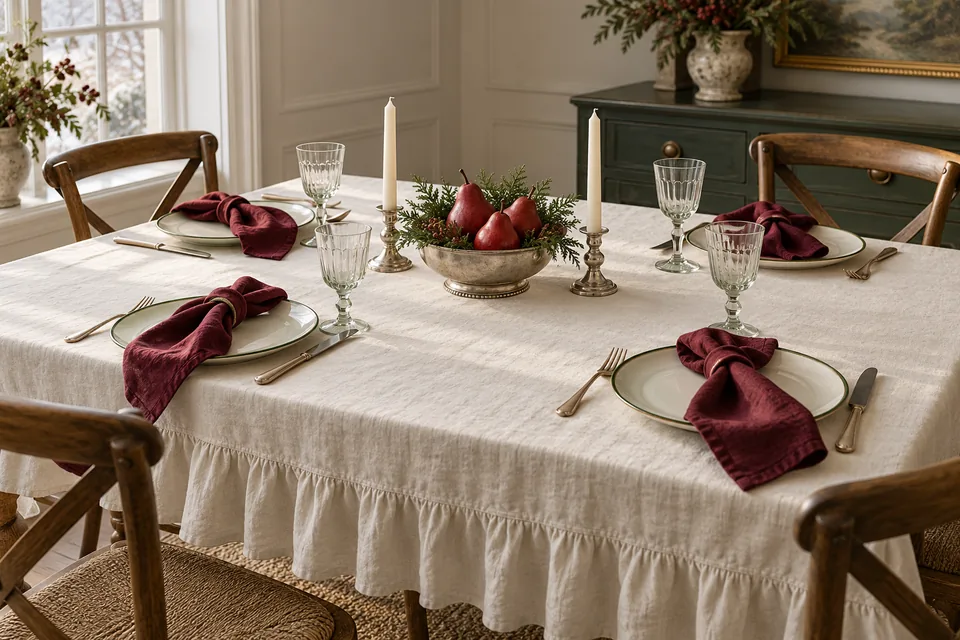
Use an ivory ruffled cloth, burgundy napkins and restrained green accents. Place a low silver bowl with three red pears in the centre. Keep the middle and guests' sight lines clear.
Use soft window light from the left and coherent shadows. Show enough of the table edge to judge the cloth.
No people, invented place names, menus, lettering or additional chairs. Do not duplicate plates or merge cutlery.
Output one perspective image, not a collage. Treat this as an AI concept that needs a physical check.
3. Compare directions without changing everything
After selecting a base image, request alternatives separately and place them next to the base. Label them on the board so you can explain the difference later.
Make a second concept from the approved base. Change only the tablecloth from ruffled ivory to plain natural linen.
Keep all four settings, plates, napkins, centerpiece, room, camera and lighting unchanged. Do not add objects.
For a third direction, keep the plain linen and change only the napkins to muted green. These are comparison requests, not pixel-lock guarantees: check whether the model also moved a chair or changed a plate. If it did, regenerate from the reference or edit the affected area. The canvas workflow guide explains how to keep references and results organized.
4. Check what an attractive render can hide
| Check | Practical question |
|---|---|
| Guest count | Are there exactly four usable places, rather than four decorative plates? |
| Scale | Do your real plates and serving dishes fit the measured table? |
| Cloth | Can the shown drape be achieved with the fabric size you own? |
| Centerpiece | Can guests see one another and reach shared dishes? |
| Consistency | Did an alternative change furniture, room geometry or product details? |
The cover provides a palette and composition example. Its candle height and dense central arrangement still need a real tabletop check. A successful-looking image does not establish a safe or workable physical setup.
5. Share a decision board, not an invented venue photo
Can this replace measuring the table? No. Use the image to agree on visual direction, then verify sizes and access physically.
Can I use it to advertise my tableware? Verify every represented product detail and clearly identify concept styling. Keep authentic item photographs available; do not imply the illustrated venue or event exists.
How should I save it? Keep individual approved images as well as a canvas overview. A board export combines the layout into an image and is not an editable layer project. Download important work rather than relying on indefinite storage. AI generation and assistant requests use the site's Credits rules.
For a matching product hero, see the Merrymaxxing candle exercise; for party information, use the Craftmas invitation.
Sources and further reading
Add your own reference first, then paste a prompt from this guide. AI image generation uses Credits; check the price shown before generating.