1. Decide what “seamless” means for this job
Choose a straight grid repeat first. A half-drop or brick repeat needs a different test. Record the tile’s actual pixel width W and height H; a landscape tile can repeat just as a square can. Keep the original file and do not add a border.
In image creation, choose the ratio and output size available for your model. Start with a few simple motifs and a uniform background. A request for seamless edges is a design instruction, not proof that the model met it. Sparkles does not provide an automatic seam score in this workflow.
2. Generate one tile, not a preview of many tiles
Create ONE flat surface-pattern tile for a straight grid repeat.
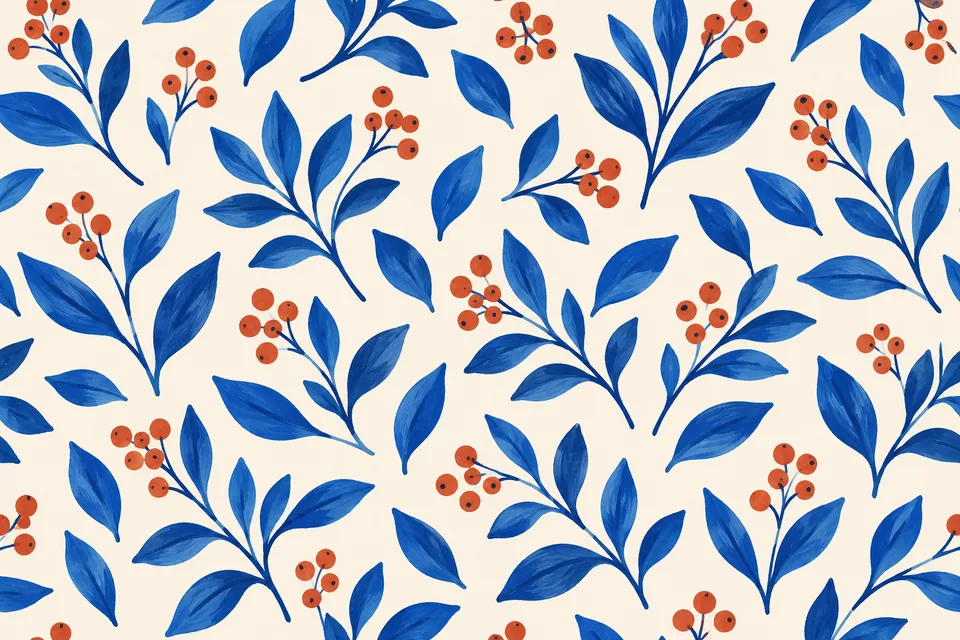
Motifs: cobalt-blue leaves and small terracotta berry clusters on a uniform warm-ivory background. Use an airy, irregular distribution with similar visual density across the whole tile.
Any motif crossing the left edge must continue at the matching height on the right. Any motif crossing the top must continue at the matching horizontal position on the bottom. Match shape, scale, color and background at these joins.
No frame, margin, vignette, directional lighting, lettering, fabric folds or product mockup. No visible tile grid. Output only the flat artwork at the selected dimensions.
Treat the result as a candidate for repeat testing; do not add a “seamless certified” label.
Download the candidate as PNG when available. Check its actual dimensions instead of assuming the prompt set them. Save a version before editing; converting a file to PNG does not undo earlier JPEG artifacts.
3. Build a precise 2 × 2 repeat
Open the image editor, import the tile and set the document to 2W × 2H. Keep the image layer at its native size, with no rotation or scaling. Duplicate it three times. In each layer’s transform properties, enter these positions:
| Copy | X | Y |
|---|---|---|
| Top left | 0 | 0 |
| Top right | W | 0 |
| Bottom left | 0 | H |
| Bottom right | W | H |
For a 1024 × 1024 tile, the document is 2048 × 2048 and the positions are (0,0), (1024,0), (0,1024), (1024,1024). Use integer coordinates. If 2W or 2H exceeds the editor’s supported size, use another editor that can preserve native pixels; do not silently shrink only some copies.
Inspect the vertical join, horizontal join and central cross at 100%. Then zoom out to find repeated empty bands or clumps. A line that changes with zoom may be a preview artifact: export the repeat and inspect that file before diagnosing it.
4. Fix the tile and repeat the test
| Symptom | What to check |
|---|---|
| Cut-off leaf at the join | Opposite edges do not continue the same motif |
| Pale hairline | Border pixels, transparency or fractional positioning |
| Wide light/dark stripe | Background shading changes across the tile |
| Obvious checkerboard rhythm | Motif density differs between centre and edges |
Revise the original pattern tile, using the attached repeat preview only to locate the defect. The visible problem is: [describe the join and motif].
Keep the blue-leaf and terracotta-berry palette, motif scale and flat ivory background. Correct the corresponding opposite edges together. Do not add a border, mirror the whole design or blur the entire image.
Return ONE tile at the original dimensions, not the 2 × 2 preview. I will recheck all four joins after this change.
An AI revision can move other motifs. Replace all four copies with the revised tile and inspect again. For an exact edge repair, use a pixel editor with wrap-around or offset tools and check the exported result; this guide does not imply that Sparkles has an automatic offset-and-repair command.
5. Keep the source tile and check the intended use
Which file is the repeat tile? The original single tile. The 2 × 2 composition is a review sheet, not a replacement unless you deliberately want a larger repeat. Keep the editable project too.
Does passing a visual check make it print-ready? No. Ask the printer about resolution, color profile and physical scale, and order a proof for color-critical work. A pleasing pattern does not certify textile or packaging production.
Is the check free? Manual layer duplication and positioning do not submit an AI-generation job. Image generation and assistant revisions use the site’s Credits rules; review the selected model and estimate.
Use the reference-image guide for controlled revisions and the canvas guide to keep source, candidate and review versions together.
A starter message is filled in for you to edit and send. Chat is billed by usage; clear image requests generate directly and use Credits.