1. Choose a photo with visible garments
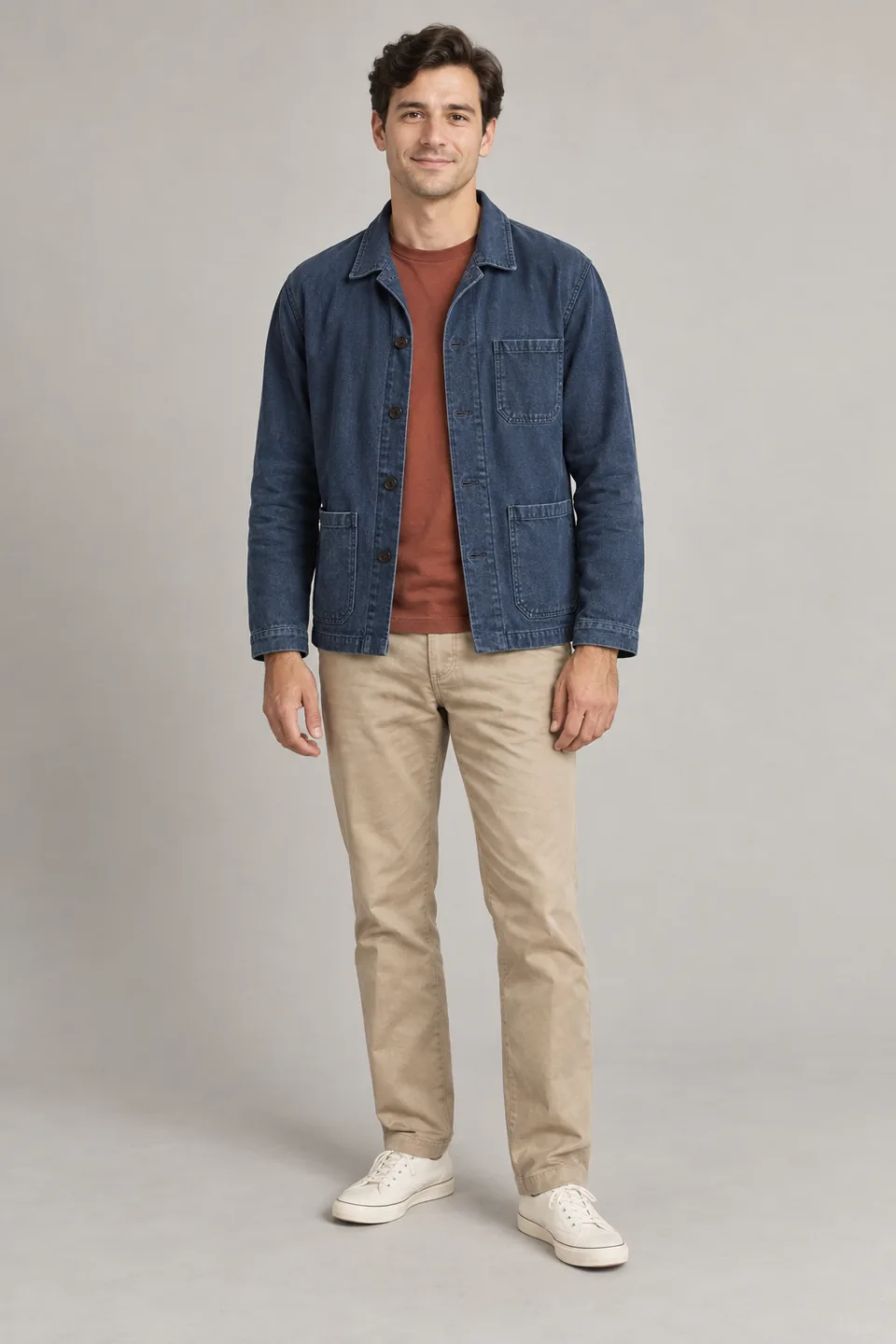
Use a front or three-quarter view with the jacket, trouser hems and shoes in frame. Reduce obstruction from hands, bags or furniture. Add a close-up if the collar or seams matter.
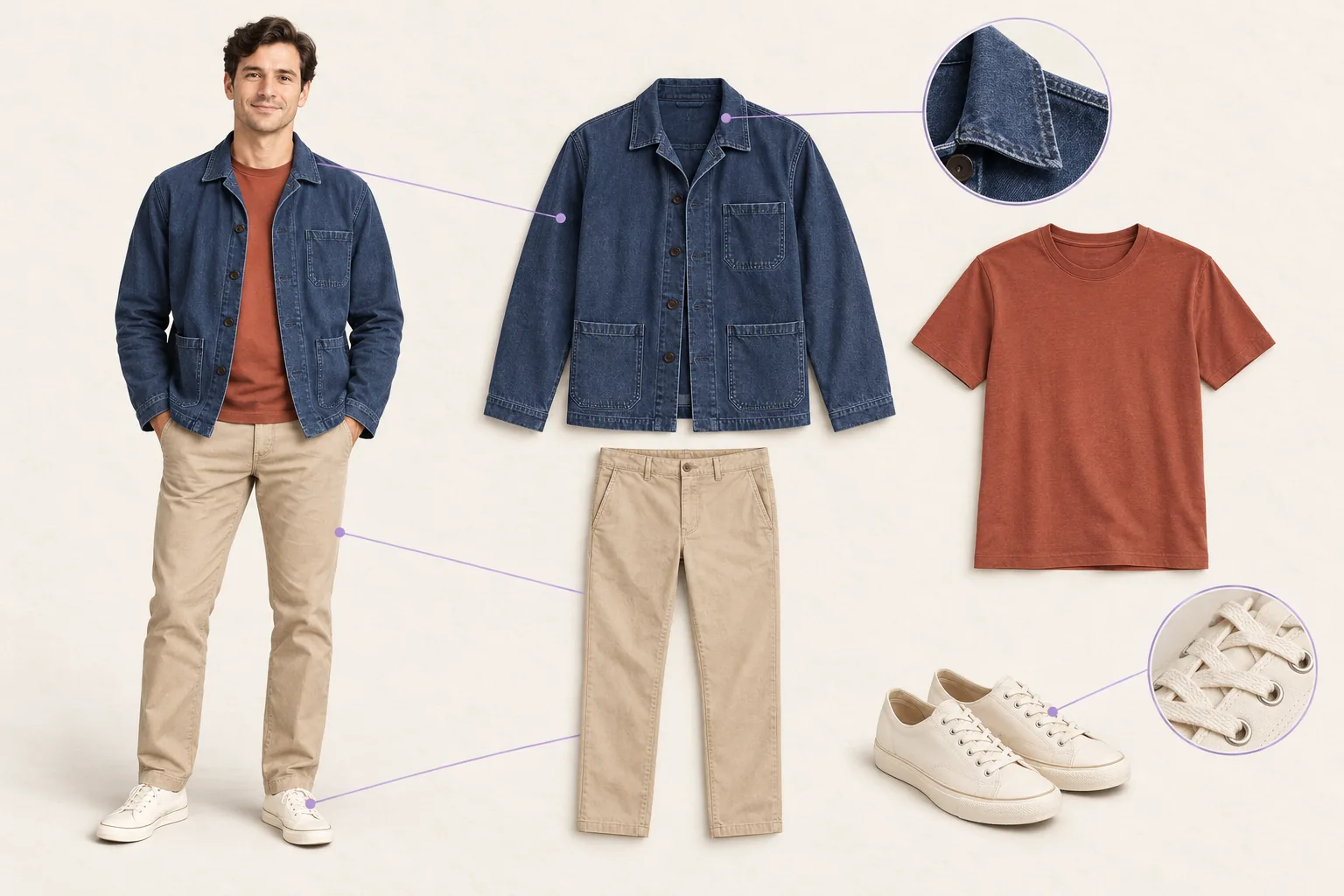
This example contains a navy jacket, rust T-shirt, beige trousers and cream shoes. For real photos, confirm permission to use the image and person. Base the study on visible construction rather than guessing hidden linings, fiber percentages or actual sizes.
2. Upload the original and describe the result
Open the creative assistant, attach the original and directly ask for a clothing breakdown image. You can also continue an existing conversation; the assistant uses your request to guide the garment breakdown and annotations.
Explicitly request “generate one image” and identify which attachments define the person or garments and which only guide layout. Asking merely to analyze a photo may produce a text explanation. The full prompt below is an optional example you can adapt to your own photo and requirements.
3. Make one board from one reference
Copy the full prompt and adapt the garment names to your photo. Remove absent items rather than adding accessories to fill space.
Generate one landscape 3:2 outfit breakdown image from my attached outfit reference.
On the left, show the same adult's complete outfit, preserving facial features, hairstyle, garment colors and main visible construction. On the right, show four separate garment groups: the navy jacket, rust T-shirt, beige trousers and cream shoes.
Add two small detail areas showing only the visible jacket collar/seam and shoe laces. Connect them to the correct locations with fine lines. Use generous space, an ivory background, muted colors and a clean fashion-study layout.
Use only these short English labels: Jacket, T-shirt, Trousers, Shoes, Collar, Laces. No long text, measurements, fiber percentages, branding or invented specifications.
Every garment must correspond to the source. Do not add bags, jewelry or new clothing, or invent back views, linings or obscured construction. Keep visible pockets and buttons plausible; do not present uncertain details as established facts.
The unlettered illustration below shows the relationship between the full outfit, garment views and close-ups. In your actual output, check short labels for spelling and correct placement too.
4. Keep two outfit references independent
After uploading two originals, identify A and B by upload order. Each output should use only its own source, with no mixing of people or garments.
I uploaded two outfit references. Call them A and B in upload order. Generate one outfit breakdown for each, for a total of two separate images.
Image 1 must use only the person and clothing in A. Image 2 must use only B. Do not transfer a person, color, shoe, bag or other garment between sources, and do not combine both outfits on one board.
Give both images a landscape 3:2 format, ivory background, complete outfit on the left and visible garments with up to two close-ups on the right. Let each source determine its own garment count; do not add objects to meet a quota.
Preserve each original's face, hair, clothing colors, silhouette and visible construction. Use short English garment labels only. Do not invent sizes, brands, fiber percentages or hidden structures.
Use the original attachments as references for each output. Do not substitute a previous generated result for the other original.
Compare each output with its own source, not just with the other output's visual style. If one is missing, check the job status before explicitly requesting that missing image, avoiding regeneration of an already completed result.
5. Correct one specific mismatch from the original
If a color changes, a pocket moves or a leader line points to the wrong place, attach the source and the result and describe a visible correction.
Attachment 1 is the original outfit. Attachment 2 is the breakdown to correct. Generate only one revised image.
Use attachment 1 for garment colors, silhouette and visible details. Keep attachment 2's overall layout, figure position and garment arrangement.
For this revision, correct only the jacket color and collar detail to match the source, and point the collar leader line to the correct place. Do not change the person's identity, T-shirt, trousers or shoes, or add garments, labels or hidden construction.
If the source does not show the detail clearly, supply a better photo instead of asking the model to guess more elaborately.
6. Compare on the canvas, then build a moodboard
Place each original beside its breakdown on the infinite canvas. Add notes for preserved structure, details to verify and possible future design directions. Arrange these images and notes manually.
A breakdown explains an existing outfit. If you want different clothes on the person, make that a separate virtual try-on request. For a new design, specify which structures may change, keeping faithful analysis and redesign as separate tasks.
7. Review before sharing
- Do the person and four garment groups correspond to the original?
- Are colors, lengths, collars, pockets and visible buttons plausible?
- Do lines point to the right details, with correct labels?
- Have extra bags, accessories or garments appeared?
- Are unknown materials, hidden structures or sizes being presented as facts?
- Have you downloaded the source and final result?
Ordinary generated images are generally retained for seven days. Adding an image to a canvas uses a 30-day period from first addition; repeated use does not extend it. AI image generation uses Credits, so check output count and the displayed price. A breakdown supports visual discussion; it does not replace physical inspection, measurement or pattern-making. See AI outfit breakdown for the tool overview.
A starter message is filled in for you to edit and send. Chat is billed by usage; clear image requests generate directly and use Credits.