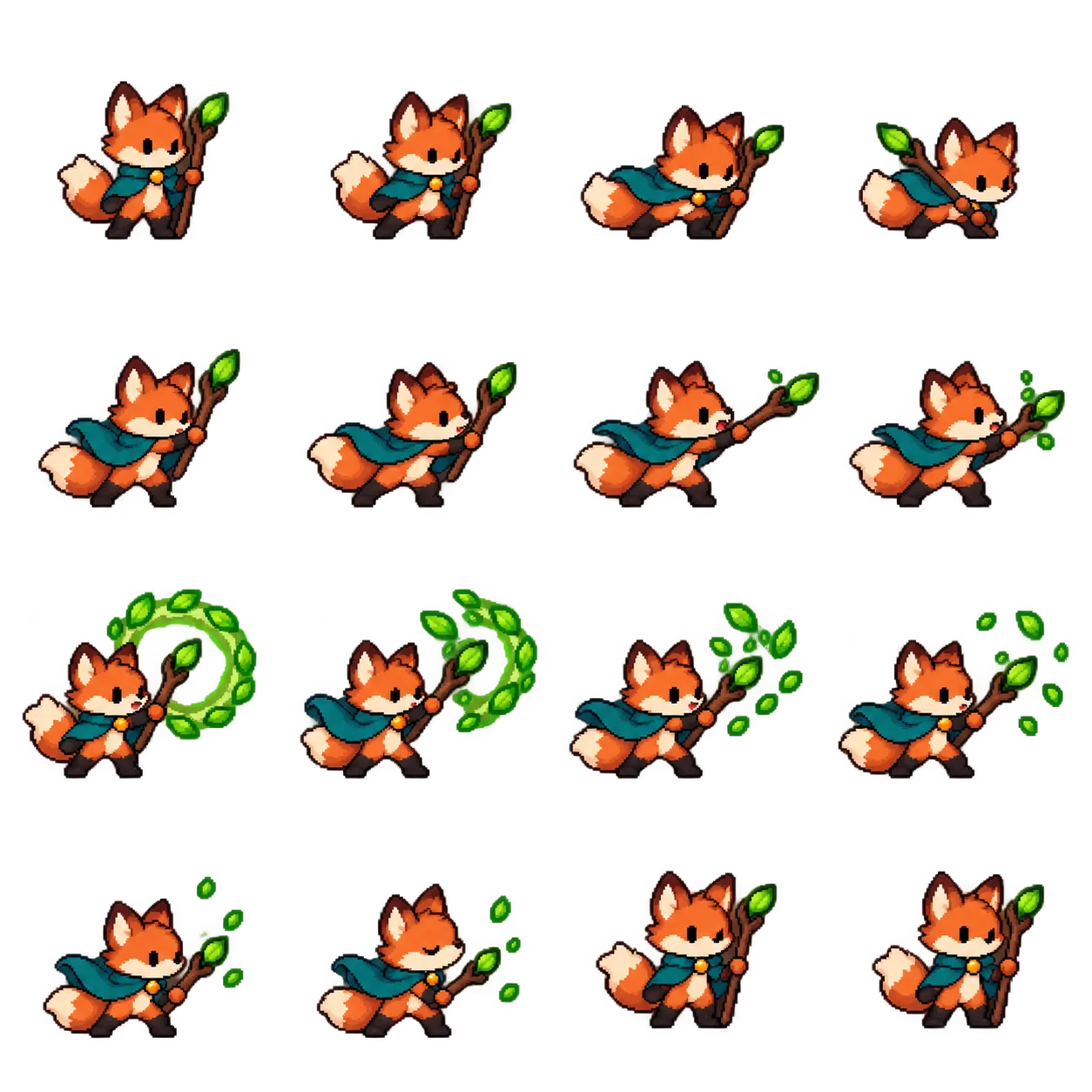
Write the motion before drawing it
Use exactly four columns and four rows, read left to right and top to bottom. Our original fox courier has rust fur, a cream muzzle and tail tip, a teal cape, dark boots and a leaf-topped staff.
Plan frames 1–2 as ready, 3–5 as anticipation, 6–8 as the forward gesture, 9–10 as the leaf-ring peak, 11–13 as dispersal and return, and 14–16 as settling into the first pose. Limbs, tail and cloth should change with the action. Moving or rotating the same cutout sixteen times does not create convincing motion.
Keep the camera and cell coordinates stable
Request the same view, character size, palette, pixel size and relative ground baseline in every cell. Leave transparent padding around the complete character, staff and effects. Nothing should cross a cell edge. Do not automatically trim each frame to its visible silhouette: that changes the origin and makes playback jump.
For an easier study, use the original seedling robot idle template. A gentle body bob, a blink and a leaf sway can be evaluated without a large effect obscuring the silhouette. Both full prompts are below.
Treat generation as a draft to inspect
Generate a square PNG. Count all sixteen cells, check the action order, compare the first and last poses, and inspect each cell at high zoom. A checkerboard-looking background is not proof of transparency; use a viewer that exposes the alpha channel.
Our fox sample was revised because its initial staff and effect crowded the sheet edges. The revised image is a clearer action study, but exact baselines and spacing still need frame-by-frame adjustment before engine use. The robot sample also needs registration review. These are generated concept sheets, not verified, ready-to-import game assets.
The separate export workflow
- Keep a lossless PNG master and verify that width and height divide by four.
- In a sprite editor, split the sheet into sixteen equal cells in reading order. Keep a fixed cell canvas and anchor; do not resize frames independently.
- Repair clipped effects, anatomy, palette drift and alignment. Check real alpha and edge halos on both light and dark backgrounds.
- Play the sequence, then adjust individual frame durations: anticipation may hold longer, the peak can be brief, and the return should settle. A 1.5–2 second cycle is a starting point, not a fixed rule.
- Export sixteen numbered RGBA PNGs plus a PNG sheet. Build a GIF preview with a consistent palette and suitable frame disposal; GIF transparency is limited compared with PNG alpha.
- Verify playback and the loop, then package the numbered PNGs and timing information in a ZIP if your downstream tool needs it.
Sparkles Editor currently produces still images and does not perform these GIF/ZIP exports. Keep this stage in your production plan rather than silently dropping it.
The complete action and idle prompts
These prompts keep the character, all sixteen stages, registration, effects, transparency and review requirements. If you provide a character reference, attach it and explain what must stay fixed.
Sixteen frames of a forest spell
Produce one square PNG sprite sheet with exactly 4 columns and 4 rows: 16 equally sized cells, read left to right and top to bottom. Draw the same original chibi fox courier in every cell: rust-orange fur, cream muzzle and tail tip, short teal cape, dark boots and a small wooden staff topped with one green leaf. No recognizable franchise character. If a character reference is supplied, translate that character's visible face, hairstyle or fur, outfit, equipment, colors and proportions consistently into this pixel vocabulary instead. Plan one complete action: a gentle staff gesture that releases a small ring of green leaves. Frames 1–2 ready; 3–5 anticipation with the body lowering and staff drawing back; 6–8 forward gesture and cape follow-through; 9–10 leaf-ring peak; 11–13 leaves disperse and the staff returns; 14–16 settle back into the first ready pose. Vary the body, limbs, ears, tail and cloth with intentional pose changes, not translation or rotation of an unchanged cutout. Keep the effect appropriate to the character's staff. Use crisp 16-bit-style pixel clusters, a limited palette, strong silhouettes and consistent pixel size for both the character and leaves. Fixed camera angle, constant character scale, stable center registration and identical ground baseline throughout. Each cell contains exactly one complete figure and its effect, with ample transparent padding; no part may touch a neighboring cell or get cropped. Keep anatomy, cape, boots, staff and palette identical in all sixteen views. Request a genuine RGBA transparent background. Do not draw a checkerboard, white backdrop, scenery, ground tiles, grid lines, frame numbers, captions, logo or watermark. No antialiased blurry outlines, painterly smears, photorealism, added limbs, shrinking character or random costume changes. Inspect the result for exactly sixteen distinct consecutive poses, complete extremities, clean cell separation, readable pixel edges and a final pose compatible with frame 1. Deliver the static PNG sheet. A GIF, individual frame files and their transparency/timing must be separately exported and checked; do not claim they were created by this still-image request.
Use this templateA tiny robot takes a breath
Create one square, exactly 4-by-4 pixel sprite sheet: sixteen equal cells in chronological row-major order. Character: an original small garden robot with a rounded cream metal body, two dark square eyes, stubby charcoal boots, moss-green gloves and one sprout growing from the top of its head. Keep all design features and proportions unchanged across the sheet. If a reference image is provided, use its character identity and equipment instead of inventing a new character. Design a subtle, readable idle cycle rather than an attack: frames 1–3 neutral ready pose; 4–6 a gentle body lift and sprout tilt; 7–8 a brief blink with slightly raised hands; 9–11 the body settles and hands relax; 12–14 the sprout sways back; 15–16 return smoothly to the exact ready registration. Give torso, arms and sprout real small pose changes. Keep both feet on the same baseline; never slide the whole character around the cell. The final frame should flow into the first without a positional jump. Render in crisp 16-bit pixel-art language with visible square clusters, consistent edge stepping, a restrained cream/charcoal/moss palette and a readable silhouette. Use one fixed camera and constant character dimensions; no perspective or lighting change between frames. Include only the robot, with no props or scenery. Leave generous empty padding around head, hands and feet so every cell can be cut cleanly. No cell overlap, cropping, duplicated figures within one cell or missing frame. Use a true alpha-transparent PNG background, not a painted checker pattern or a white rectangle. No grid lines, cell numbers, lettering, speech bubbles, signature, watermark, soft blur or photorealistic materials. Keep the same eyes, body seams, gloves, boots, head sprout and palette in all frames. Quality check: sixteen distinct readable states, stable foot and center alignment, correct anatomy, sufficient padding and a seamless ready-to-ready sequence. Output the static sheet; animation playback, alpha inspection, slicing and timed GIF export are separate steps and must not be reported as completed here.
Use this templateSource method and original characters
The workflow was informed by Kiki’s sprite-sheet post and full prompt, reviewed on September 24, 2026. We use an original fox and seedling robot instead of the source’s franchise character. The idle variation is our own extension.
Lock a more detailed character first with the complete character-sheet template, then use that approved reference throughout later motion studies.
A starter message is filled in for you to edit and send. Chat is billed by usage; clear image requests generate directly and use Credits.