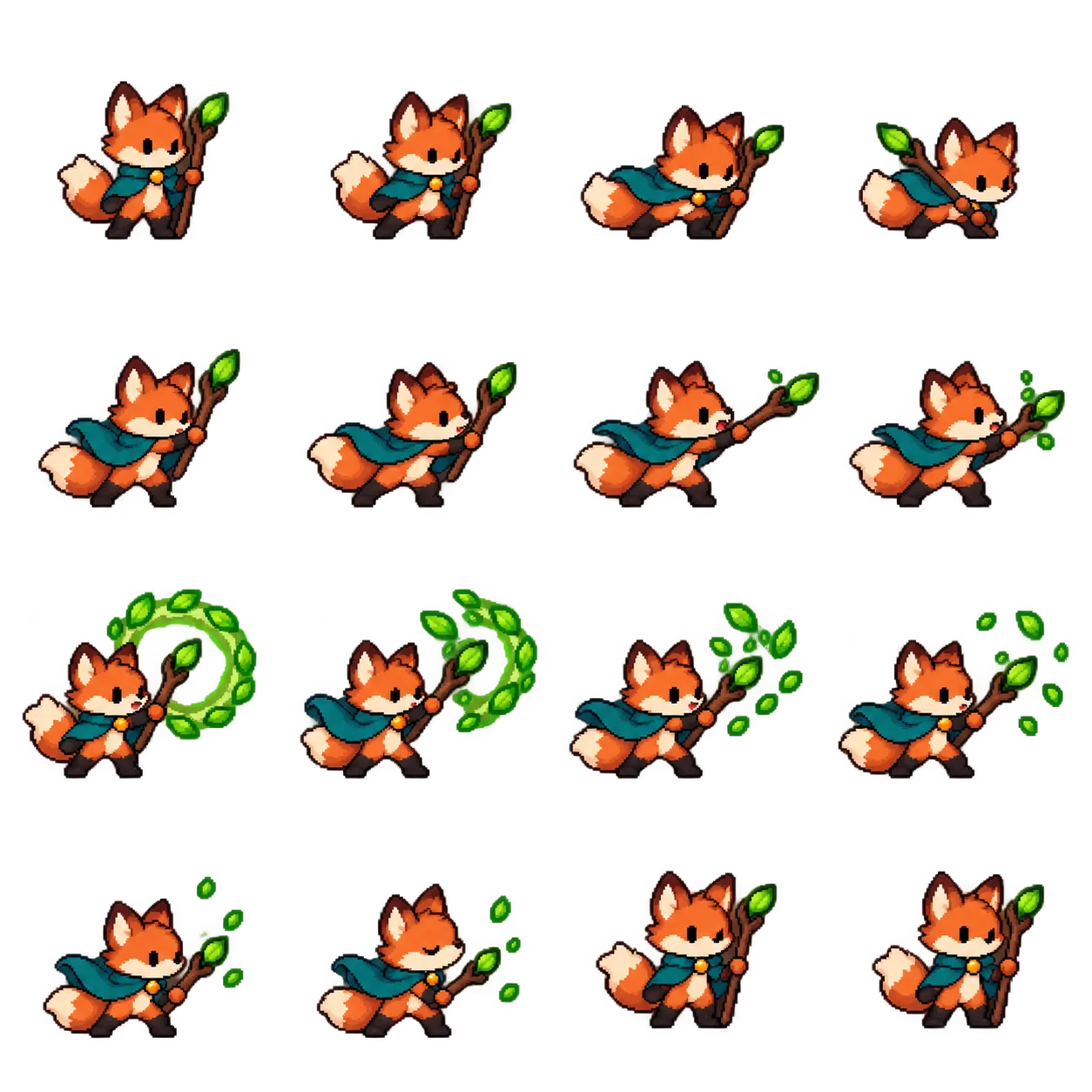
Give one image a sense of motion
The cover is a still 4 × 4 sprite sheet. Below is a looping GIF exported in our animation studio from the same original fox artwork. It moves from anticipation through a jump and back to rest. Try the example, then replace it with your own character. An AI-made sheet gives you frames; checking their sequence and timing gives you a usable motion.

Sprite sheet to GIF in three steps
- Open the animation studio. Play an example or import your own PNG, JPG or WebP sheet. Importing, previewing and exporting run in your browser, without sign-in or Credits.
- Set the rows and columns, then preview frames from left to right and top to bottom. A 16-frame sheet often uses 4 × 4, but its actual cells may be uneven. Detect gaps or move cut lines to the real boundaries before exporting.
- Tune speed, loop mode, frame order or per-frame holds. Download a GIF for sharing, or a PNG atlas with JSON frame data for a game or web app.
No sheet yet? Start with one character and one action
You can also request a new AI-generated action sheet from the studio. Describe the character, the beginning and end of a single motion, a fixed camera and the intended grid; ask for a transparent background. Creating a new AI image requires sign-in and uses Credits. Converting a sheet you already have is free.
A single complete cycle is easier to review than running, waving and turning in one sheet. Empty or effects-only frames can be intentional. For a detailed motion prompt and frame-by-frame checklist, read the 16-frame sprite sheet tutorial.
Keep the whole character inside each frame
A prompt that says “4 × 4” does not guarantee equally spaced cells. Inspect the original image and grid, run gap detection, then move any remaining cut lines into the actual whitespace. The studio pads uneven frames with transparency instead of stretching them. Check every frame, especially hair, ears, hands and the highest point of a jump. If your story intentionally makes the character vanish, keep that frame.
Choose transparency and the right export
For a character you can place over other designs, import a PNG or WebP with a real alpha channel. A checkerboard drawn into an image is not transparency. You can try removing a solid-color background, then check edges against light and dark previews. GIF supports on/off transparency; a PNG atlas retains soft alpha and editable frames. The converter currently scales each frame to no more than 320 pixels on its longest side.
A small movement can make a character memorable
Animate a waving avatar, test a game character’s walk cycle, or preview a mascot’s expression before using it elsewhere. The useful habit is to preview, align and adjust, then export. Open the animation studio and try the fox.
Importing, previewing and exporting an existing sheet are free. New AI-generated sheets require sign-in and use Credits.